
Open Career Format
A private career notebook that becomes every resume you'll ever need.
OCF is for preserving your own career history as it happens: what you did, what changed, what you learned, and what mattered.
Last updated: 2026-05-25
A private career notebook that becomes every resume you'll ever need.
OCF is for preserving your own career history as it happens: what you did, what changed, what you learned, and what mattered.
Last updated: 2026-05-25
If you're an individual, get started quickly. If you are comfortable sharing the materials with the LLM or tool you are using, attach your resume and a job description. Do not include anything you would not want that tool to process.
Using only these OCF references:
https://opencareerformat.org/llms.txt
https://opencareerformat.org/schema-core.json
https://opencareerformat.org/prompts/authoring.md
https://opencareerformat.org/prompts/curation.md

plus my attached resume and job description, help me create a better resume and cover letter for this role.

Do not search for general prompt-writing, resume, schema, or background advice unless I ask you to. If I attach an existing OCF, use the curation prompt first. If no OCF file is attached, ask briefly whether one exists or treat the attached material as source artifacts for an imported starter until I review it.

Before writing, use OCF to track the gaps between my source material and the target role: map my source material to reusable career facts, achievements, skills, narrative variants, cautions, open questions, target fit, missing evidence, and suggested OCF updates.

Ask targeted questions where needed. After I answer, draft the resume and cover letter. Finally, suggest what should be saved into my OCF for next time.
If you're looking to leverage OCF in some other way: start with spec/usage-patterns.md.
Most career details disappear before you need them. The numbers, stories, decisions, and context that explain your work are scattered across memory, old documents, performance reviews, dashboards, notes, and systems you may not use forever.
The Open Career Format (OCF) solves this. You build and update one master file that holds your private career memory — every job, every skill, every certification, every achievement, every useful note. Then, when you need a resume, profile, interview packet, or career-coach brief, a tool reads your master file and curates the version you need from memory you already trust.
Most people will use OCF first as structure for a conversation. They will bring the file to an LLM, coach, advisor, mentor, or trusted reviewer so the conversation has concrete career memory to work from. In that setting, curation and export are not heavyweight software requirements; they are the mental model that tells the conversation what to do. First decide what parts of your career history should be used, reviewed, ranked, filtered, and/or improved. Then export the type of content in the format the person needs.
If you are using an LLM, point it at this guide and the current schema: https://opencareerformat.org/schema.json. Versioned schemas remain available at paths such as https://opencareerformat.org/v0.2/schema.json for files that need a pinned schema.
For LLMs and tools, OCF also publishes a compact site map at https://opencareerformat.org/llms.txt, with links to the starter/core authoring shape, full schema, authoring prompt, recommended LLM operating prompt, and curation guidance.
The second path is tool integration. The structure of OCF is meant to capture the complexity of a career in ways that a computer can understand and help reformat or improve for different needs. How software will leverage this beyond the reference implementations is outside the scope of the format.
OCF is a schema, not a full career app. It does not prescribe one interview flow, one resume style, one scoring model, or one exporter.
But OCF is not just a blank schema either. The project includes bare-bones reference guidance so people, LLMs, and tool builders have a practical starting point: a starter/core authoring shape, an authoring prompt, a curation prompt, an interview-prep question set, and examples.
The boundary is intentional: OCF defines what gets preserved and how it stays portable. Tools decide how to ask questions, curate for a target, score relevance, and export finished files.
OCF is the file format. A candidate-owned master is one important use of it, not the only one.
The top-level person is always the subject of the OCF: the person whose career is described. The controller of the file and the editor of individual items may be someone else. Anything that flows from a working or imported file into the candidate-owned master should be proposed, reviewed, and accepted by the person first.
OCF is best understood as a living loop:
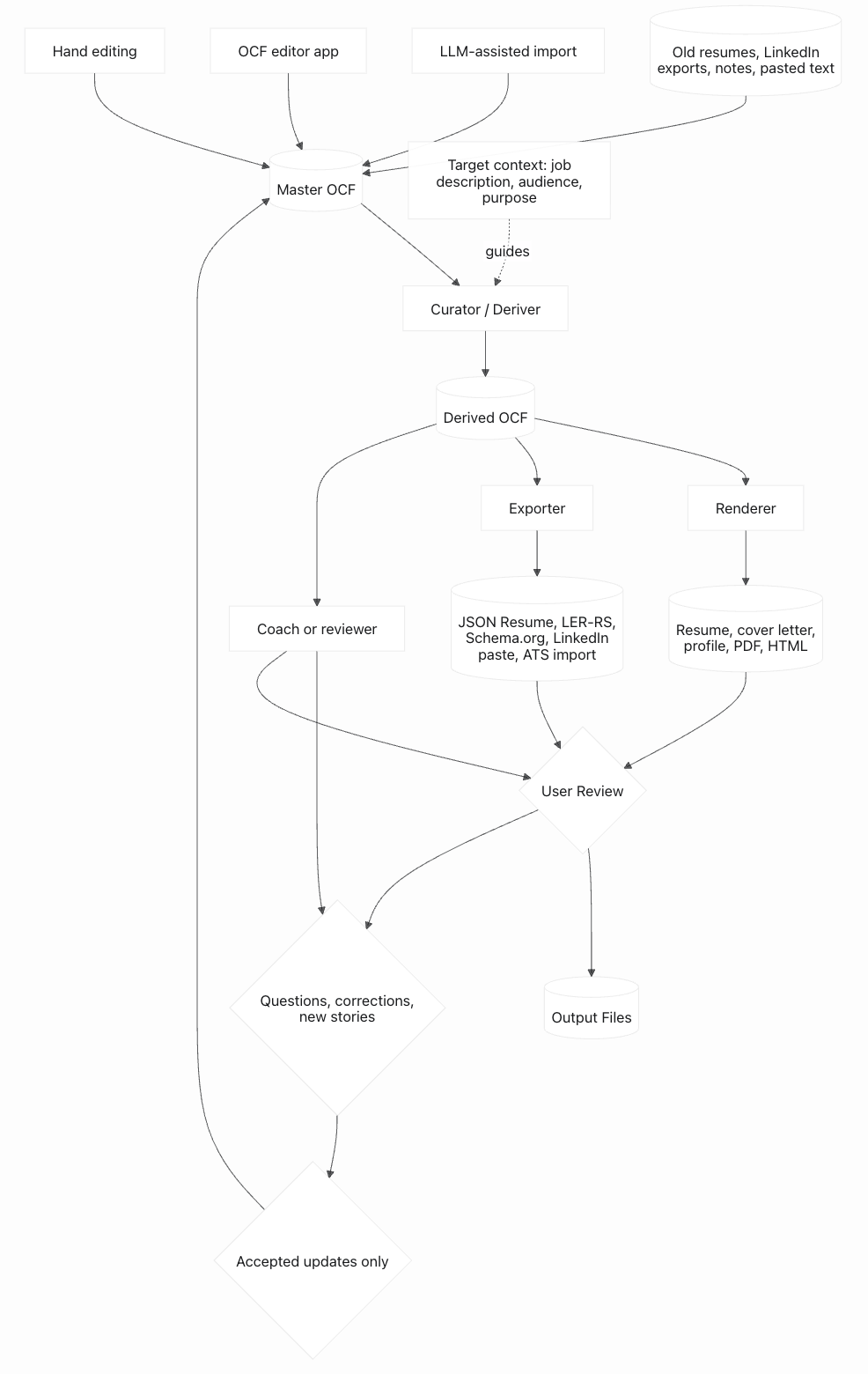
You build the master once and maintain it over time. Adding a new job, a new cert, or a new achievement is a few minutes of work. You never start from scratch again.
OCF is a file format, not a platform. The master file is yours.
sourceArtifact.Old resumes, LinkedIn exports, portfolio bios, application drafts, and role-targeted documents are not obsolete trash and not automatic truth. They are historical artifacts: evidence of what the person thought was relevant for a specific audience at a specific time.
narrativeVariants; promote new verified facts into canonical fields.openQuestions item instead of overwriting the master blindly.OCF should improve from real workflows, not only from abstract schema design. If you are using an LLM, editor, exporter, career coach, or hand-written file and you run into a missing capability, send that use case back to the project. You do not need to be a developer. A plain-language example is useful: "I wanted to store both my English and Spanish versions of the same achievement and have tools preserve both."
For ideas, missing capabilities, or "why can't OCF do this?" moments, use the suggestion form at github.com/opencareerformat/opencareerformat/issues/new/choose. For open-ended questions, early ideas, or thanks, use GitHub Discussions.
This homepage is the short version. The detailed guide explains the full schema, reflections, visibility, provenance, curation, exporters, regional fields, federal resumes, and non-goals.