
Open Career Format
A private career notebook that becomes every resume you'll ever need.
OCF is for preserving your own career history as it happens: what you did, what changed, what you learned, and what mattered.
Last updated: 2026-05-23
A private career notebook that becomes every resume you'll ever need.
OCF is for preserving your own career history as it happens: what you did, what changed, what you learned, and what mattered.
Last updated: 2026-05-23
If you're an individual: you are welcome to read the details below, but the homepage is the easier starting point for using OCF with your own resume, notes, and LLM/tool workflow.
If you're an LLM: do not rely on this page alone. Read llms.txt, the current schema or starter schema, prompts/authoring.md, and prompts/curation.md before drafting. If an OCF file is attached, start from curation guidance. If no OCF file is attached, ask briefly whether one exists or treat the resume, job description, notes, and conversation as source artifacts for an imported starter. Use OCF to track the gaps between the source material and the target: reusable career facts, achievements, skills, narrative variants, cautions, open questions, target fit, missing evidence, and proposed OCF updates before writing output prose.
If you're a developer or tool builder: start with schema.json, schema-core.json, and spec/usage-patterns.md. The guide below explains the design tradeoffs behind the schema: privacy, visibility, provenance, curation, file roles, examples, and non-goals.
Most career details disappear before you need them. The numbers, stories, decisions, and context that explain your work are scattered across memory, old documents, performance reviews, dashboards, notes, and systems you may not use forever.
The Open Career Format (OCF) solves this. You build and update one master file that holds your private career memory — every job, every skill, every certification, every achievement, every useful note. Then, when you need a resume, profile, interview packet, or career-coach brief, a tool reads your master file and curates the version you need from memory you already trust.
Most people will use OCF first as structure for a conversation. They will bring the file to an LLM, coach, advisor, mentor, or trusted reviewer so the conversation has concrete career memory to work from. In that setting, curation and export are not heavyweight software requirements; they are the mental model that tells the conversation what to do. First decide what parts of your career history should be used, reviewed, ranked, filtered, and/or improved. Then export the type of content in the format the person needs.
If you are using an LLM, point it at this guide and the current schema: https://opencareerformat.org/schema.json. Versioned schemas remain available at paths such as https://opencareerformat.org/v0.2/schema.json for files that need a pinned schema.
For LLMs and tools, OCF also publishes a compact site map at https://opencareerformat.org/llms.txt, with links to the starter/core authoring shape, full schema, authoring prompt, recommended LLM operating prompt, and curation guidance.
The second path is tool integration. The structure of OCF is meant to capture the complexity of a career in ways that a computer can understand and help reformat or improve for different needs. How software will leverage this beyond the reference implementations is outside the scope of the format.
OCF is a schema, not a full career app. It does not prescribe one interview flow, one resume style, one scoring model, or one exporter.
But OCF is not just a blank schema either. The project includes bare-bones reference guidance so people, LLMs, and tool builders have a practical starting point: a starter/core authoring shape, an authoring prompt, a curation prompt, an interview-prep question set, and examples.
The boundary is intentional: OCF defines what gets preserved and how it stays portable. Tools decide how to ask questions, curate for a target, score relevance, and export finished files.
More specifically, OCF does not specify how content is elicited, how curation makes every judgment call, how export files are produced, or how content is scored and matched against opportunities. Those are downstream tool decisions. The format preserves the facts, visibility, provenance, importance, audience tags, variants, cautions, and open questions those tools need.
OCF is the file format. The candidate-owned master is the primary use case for now, but the schema is designed to handle other file roles too. The goal is always the same, regardless of who controls the file: act as a common substrate for explaining a person's career over time, with nuance and history. That need can show up in imported starters, candidate-curated working files, export-ready handoffs, and third-party working files created by recruiters, coaches, employers, agencies, or tools. The file's meta.fileRole should make the workflow context explicit. The top-level person is always the subject of the OCF: the person whose career is described. The controller of the file and the editor of individual items may be someone else.
candidate-master: the person's private, durable career memory. This is the highest-trust personal use case and the one meant to improve over years.candidate-curated: a reduced or purpose-specific OCF prepared by or for the candidate from a master. It is a candidate-controlled working set for review, coaching, tailoring, or later export. It may still contain shared material that should not go to every downstream system.imported-starter: a provisional first-pass OCF built from resumes, LinkedIn exports, notes, or conversations. It can become a candidate-owned master after review, or remain a temporary import artifact.third-party-working: an OCF-shaped working file created by a recruiter, coach, agency, employer, or tool about a person. It may contain workflow-specific review notes, intake details, or status metadata. It is not the person's private master and should not be treated as canonical for the person.export-ready: curated content prepared as a handoff to a specific exporter or downstream system. At this point, the selection and visibility review should already be done; the exporter decides format and presentation, not what career claims belong.In short: candidate-curated is a reviewed working draft controlled by or for the candidate; export-ready is the handoff input for a specific exporter or downstream destination.
This distinction prevents accidental authority. A recruiter may use OCF to build a working file from a resume and candidate call; that file can be useful for the recruiter without ever becoming the candidate's master. If content flows back into the candidate-owned master, it should arrive as proposed updates for the person to accept, edit, or reject.
For more detail, see spec/usage-patterns.md.
OCF is best understood as a living loop:
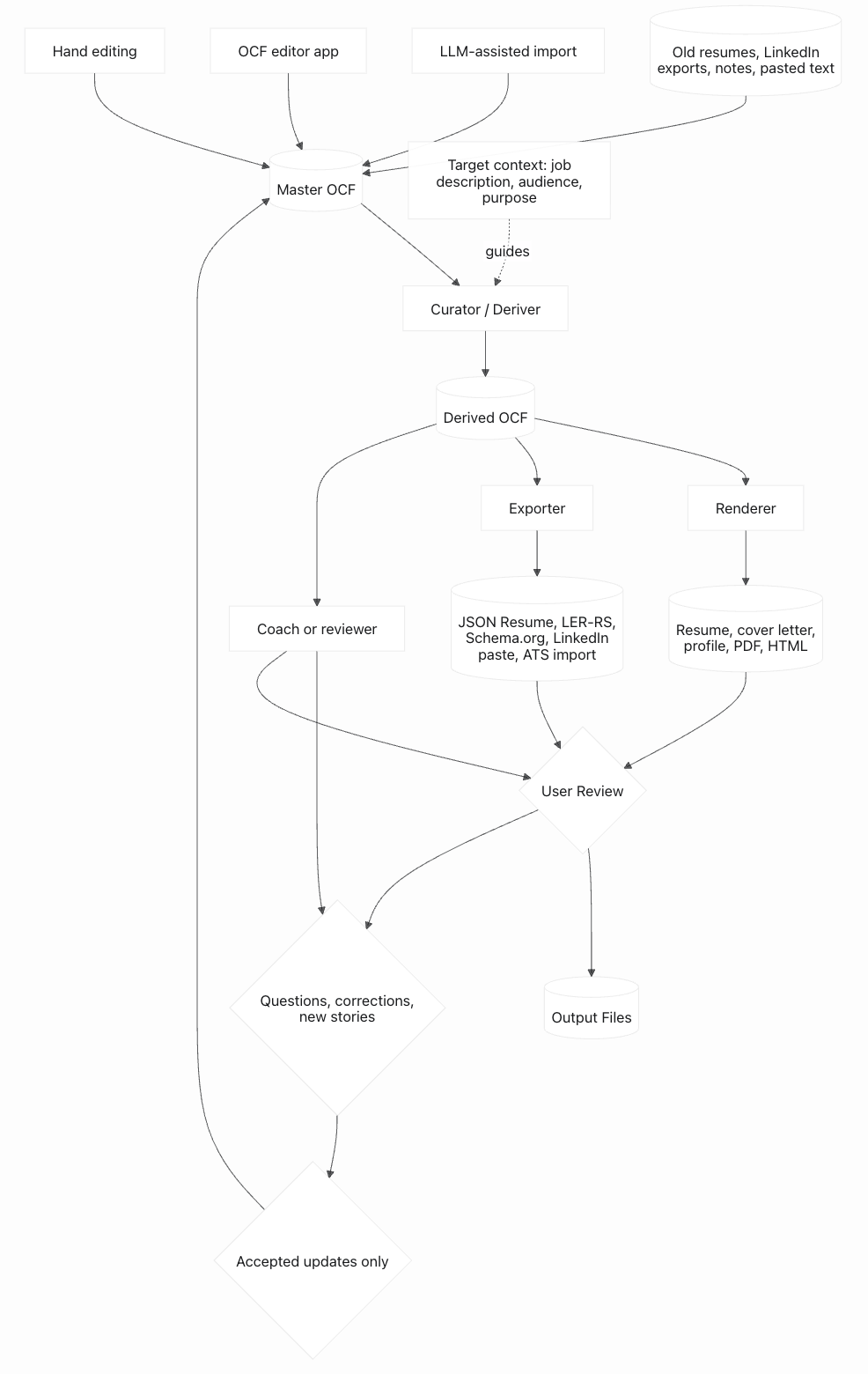
You build the master once and maintain it over time. Adding a new job, a new cert, or a new achievement is a few minutes of work. You never start from scratch again.
OCF is a file format, not a platform. The master file is yours.
sourceArtifact.Old resumes, LinkedIn exports, portfolio bios, application drafts, and role-targeted documents are not obsolete trash and not automatic truth. They are historical artifacts: evidence of what the person thought was relevant for a specific audience at a specific time.
narrativeVariants; promote new verified facts into canonical fields.openQuestions item instead of overwriting the master blindly.OCF should improve from real workflows, not only from abstract schema design. If you are using an LLM, editor, exporter, career coach, or hand-written file and you run into a missing capability, send that use case back to the project. You do not need to be a developer. A plain-language example is useful: "I wanted to store both my English and Spanish versions of the same achievement and have tools preserve both."
For ideas, missing capabilities, or "why can't OCF do this?" moments, use the suggestion form at github.com/opencareerformat/opencareerformat/issues/new/choose. For open-ended questions, early ideas, or thanks, use GitHub Discussions.
All of your work history lives in a single list called experience. Each entry is an experience entry: one relationship, tenure, assignment, or period in your timeline — a company tenure, military service, self-employment, caregiving, or even a career break.
This is one of the most important design decisions in OCF. By putting everything in one chronological list — traditional jobs, self-employment, caregiving, sabbaticals, military service — your career has no unexplained gaps. A three-year gap isn't suspicious when it clearly says "Full-time caregiver for elderly parent" or "Career break — traveled Southeast Asia."
Within each experience entry, you list your positions — the specific roles you held. Promotions, lateral moves, and reassignments are all just positions within the same entry. Achievements, projects, and competencies nest inside positions, so the relationship is structural. You never have to explain "this achievement happened at this job" — it's already there.
Acme Corp (experience entry, 2018–2024)
→ Software Engineer (position, 2018–2020)
→ Built the identity platform (achievement)
→ Senior Engineer (position, 2020–2022)
→ Engineering Manager (position, 2022–2024)
→ Fire safety captain, 6 years (spanning achievement)
The master file has sections for everything a career can contain. You don't need to fill in all of them — just what applies to you.
Most people use a handful of these. A useful OCF can start with person information, one experience entry, one position, and a few achievements. The rest of the schema exists so the file can grow without changing formats.
Achievements are the structured layer of OCF — the part that can be curated into resumes, cover letters, and exports. Reflections are a second, parallel layer: open-ended, often subjective answers about each role and company that are useful for outside review, coaching, interview prep, self-reflection, and conversational tools, but are not appropriate for resumes. They live alongside achievements rather than competing with them.
The questions reflections are designed to answer come from the Topgrading interview methodology (Smart, Who: The A Method for Hiring) and similar structured interview frameworks: who did you work for, how would that person rate you 1–10, what did you like most about this role, what's your biggest mistake, why did you leave, what are you proudest of. Hiring managers ask these constantly. Candidates rarely think them through in advance. Writing the answers once into a master file means every future interview starts from a much stronger position.
The "who did you work for" answer is structured data, not just reflection prose. OCF stores it on position.supervisor, including name, title, contact methods, and an optional LinkedIn URL. That URL is useful because work emails and phone numbers go stale, while a LinkedIn profile often remains the durable way to identify the person later. Supervisor details default to private.
OCF keeps this intentionally lightweight. In a long career, "worked for" can mean direct manager, skip-level leader, client sponsor, commanding officer, principal investigator, or an executive who was close in one period and several layers away in another. The v0.2 schema captures the most relevant person for the role and leaves deeper reporting-history nuance to private notes or future schema work, rather than trying to become a professional-network graph.
Reflections default to visibility: private because they are sensitive personal content — they include things you would never put on a resume and don't want a recruiter to read. They can be opted up to shared on a per-reflection basis when the user wants to share specific reflections with a coach or trusted recipient, but the default keeps them out of export-ready outputs.
{
  "id": "meridian-proudest-of-2024",
  "kind": "proudest-of",
  "prompt": "What are you proudest of from this role?",
  "response": "Leading the hospital ransomware recovery without losing patient-care continuity.",
  "visibility": "private",
  "provenance": {
    "source": "interview-derived",
    "date": "2026-05-21"
  }
}
OCF publishes a recommended question set and the canonical kind strings at prompts/interview-prep-questions.md. Tools may use that question set verbatim, adapt it, or add new kinds; the format imposes no fixed list, but the published canonical kinds keep reflections portable across tools.
The relationship between the two layers is one-way: reflections can seed achievements, not the other way around. A conversation that elicits a proudest-of or biggest-success reflection often surfaces a story that deserves to exist as a structured achievement entry too — with statement, longform, metrics, and audiences. The recommended pattern is to keep both: the reflection preserves the user's voice and the raw memory; the achievement is the distilled, structured item used for outputs. The provenance on the achievement can reference the reflection it came from, so the lineage stays traceable.
Look at the Meridian Director of Cybersecurity position in spec/examples/sample-resume.ocf.json for the worked example. The position carries three reflections demonstrating the patterns: a numeric one (boss-would-rate-1-10), a prose one that seeded an existing achievement (proudest-of, with provenance linking to mhs-ransomware-2024), and an undistilled one that's a candidate for future mining (biggest-mistake — the framing for a structured achievement isn't obvious yet, so it stays a reflection for now). The position also has teamSize and directReports populated, since "how big was your team" is itself a standard interview question that wants a structured answer.
The two-layer design resolves a tension that comes up the moment a tool tries to interview a user: open elicitation is the right UX, but structured storage is the right output. Reflections handle the elicitation side; achievements handle the output side; LLM tools move content between them as the conversation matures.
Five top-level fields exist primarily for the conversational use case. None of them belong on a resume; all of them help a coach, AI tool, or hybrid workflow engage with the file. Each is intentionally minimal in v0.2 — enough to hold the space and let early usage inform the shape — and marked with a $comment noting that more structure will likely be added in a future revision.
goals tells a coach or AI where the user is trying to go. The schema records where you've been; goals records where you want to be. The shape allows multiple target roles (each with a preference level — primary, secondary, open-to), multiple locations (including remote as a valid value), constraints that rule certain roles out, and motivations that explain why the user is looking. A coach or AI tailoring outputs reads goals first; without it, advice can only be generic. Defaults to private.
cautions captures things the user explicitly does not want claimed on their behalf. The expected origin pattern is corrective: a coach or AI suggests a framing, the user pushes back, and the correction gets stored here so future drafts don't re-suggest the same overclaim. Cautions are not a list of weaknesses — they are constraints on positioning. Each entry records the claim to avoid, an optional reason, and provenance. Defaults to private.
openQuestions is a working queue of things to revisit in future conversations — stories that need more mining, claims that need verifying, framings that aren't yet nailed down. Lets the user, coach, and AI pick up where they left off. The reflection mining pattern can park items here when a structured framing isn't obvious yet. Defaults to private.
voice tells a writer or AI how to write in the user's name. Most people cannot articulate their own voice from scratch, so the field is prescriptive at the high level — a small canonical set of named styles (plain-direct, warm-precise, formal-traditional, creative-conversational, executive-terse) — while allowing fine-grained customization through avoidPhrases and preferredPhrases lists and an open customNotes field. Pick a canonical style as a starting point; refine through usage.
aiInstructions is an open-text field that customizes or supplements the canonical LLM prompt for this specific file. Use it when the canonical instructions are right in general but a specific behavior matters for this user — "push back when I undersell," "prefer paragraphs over bullets," "I'm mid-pivot from one function to another and the importance tags lag behind the direction I'm trying to go." Tools using the canonical prompt should append the user's aiInstructions to it. Defaults to private.
None of these five fields are required. A file with none of them validates fine and is still useful. They exist so users who want coaching or AI assistance to behave a certain way have a structured place to say so — and so tools have a stable place to read direction from, rather than re-eliciting it every session.
Your master file is private. It is a sensitive personal archive, not a document to hand to an employer, colleague, recruiter, ATS, or public website. It may be appropriate to share the master with a trusted career coach, advisor, attorney, or tool, but that is a high-trust disclosure. When you generate a resume or profile from it, you are creating an exported artifact for a specific purpose, and you need to control what makes it into that output. OCF gives you three levels of visibility:
Every item in OCF has a visibility setting. This is a curation hint, not a security boundary. Most things default to shared — they can show up in ordinary recruiter-facing outputs but won't appear on a public job board unless you explicitly opt them in. Sensitive fields like salary, exit reasons, date of birth, and references default to private — they stay in the master and should not leave unless you deliberately change them.
Visibility is relative to the file role and controller. In a candidate-owned master, private usually means private to the candidate's master. In a third-party working OCF, private may mean private to the recruiter, coach, agency, employer, or tool workflow controlling that file. A note can be about the subject without being visible to the subject.
Compensation and sales-plan details belong in the master, not in ordinary outputs. OCF can preserve salary history, base/bonus/commission by year, quota, attainment, bookings, pipeline, rank, and territory context because those details are easy to forget and useful for applications, negotiation, and interview prep. They default to private. If a salesperson wants to claim "138% of quota" on a resume, that should be a reviewed achievement metric; the raw quota plan, pay history, and plan caveats should remain private unless the user explicitly includes them.
Visibility doesn't cascade. A private experience entry can contain public achievements. This means you can have a stealth-mode job where you can't name the company, but you can still claim the work you did there. The curation tool handles those edge cases.
As a concrete example, the reference curation tool in this repository includes a --public-only option. That mode only lets public data through and discards everything else, including shared items. It is intentionally conservative: a LinkedIn profile, public bio, resume, and private master OCF may all tell different versions of the same career, and public export paths should not assume that shared or private material belongs in the output.
OCF is personally identifiable information. A complete career file can identify you even without a mailing address. Protect your master OCF the way you would protect a detailed resume, reference list, interview notes, and employment history combined. Curated/export-ready files are the shareable layer, but they will often still contain PII because resumes themselves contain PII. Any exported artifact can identify you through organization names, dates, locations, rare skills, metrics, or combinations of facts.
Do not store government identity numbers or account secrets in OCF: Social Security numbers, national insurance numbers, taxpayer IDs, passport numbers, driver's license numbers, bank details, passwords, API keys, or similar identifiers do not belong in this format. Some regional resume fields such as date of birth, nationality, gender, photo, or marital status exist because they are expected in some countries and discouraged or prohibited in others; keep them private by default and include them in curated/export-ready content only when the target region and purpose make that appropriate.
OCF is a schema, not a security product. The format can make career data portable, structured, and easier to review, but it cannot make private data safe by itself. The real risk is data handling: where the file is stored, uploaded, synced, logged, indexed, backed up, shared, and exported. Treat the master OCF, source artifacts, curated/export-ready files, and exported outputs as sensitive files unless you have intentionally made a specific artifact public.
Validation checks shape, not truth. A valid OCF file can still contain false claims, unsupported metrics, private material, stale facts, or poor judgment. Schema validation only proves the file has the right structure. It does not prove the content is true, safe to share, appropriate for a target role, or reviewed by the user.
Export files should be archived deliberately. Most users will want to keep a copy of every OCF, resume, cover letter, profile, or interview-prep packet that actually went out the door. Those artifacts are useful records of what was represented to a specific audience at a specific time. The risk is not keeping them; the risk is keeping them accidentally, unnamed, or mixed with drafts. Downstream tools should name generated files with enough information to understand their purpose later, and should include a date. Recommended patterns are master.ocf.json, curated/acme-ciso-2026-05-21.ocf.json, exports/acme-ciso-resume-2026-05-21.pdf, and exports/acme-ciso-interview-prep-2026-05-21.md. A dated name is not provenance, but it helps users avoid sending the wrong file, compare what changed between applications, and separate sent artifacts from disposable working drafts.
Source artifacts may be more sensitive than the OCF. Old resumes, LinkedIn exports, chat transcripts, portfolio drafts, and career notes can contain mailing addresses, old phone numbers, salary history, supervisor names, identity-adjacent details, and mistakes the user would not repeat today. OCF can reference those artifacts without embedding them, but the folder that holds them still needs protection.
A coach does not always need the master. A trusted career coach may be an appropriate recipient for the master OCF in some cases, but that should be a deliberate high-trust disclosure. In many workflows, the better pattern is to prepare coach-specific curated content: enough detail for the coach to help, with private reflections, dangerous identifiers, irrelevant source artifacts, and sensitive notes withheld unless the user explicitly includes them.
The master accumulates, but the user can delete. Tools should not delete real but currently irrelevant facts just because today's resume does not need them; curation should filter those out. But the file is still the user's text file. If the user wants material gone because it is false, dangerous, obsolete, too sensitive, or simply no longer something they want to preserve, tools should offer safer alternatives first — such as marking it private, adding a caution, or recording a future do-not-use / blacklist-style suppression rule when the schema grows one — and then delete it if the user confirms. Deletion should be explicit, versioned when possible, and never treated as ordinary curation.
Different tools deserve different access. A read-only reviewer can inspect the master and suggest edits. An exporter should usually receive only curated/export-ready input. A public export should not need private reflections or source artifacts. A trusted editor can write back to the master only after the user accepts changes. Tool access should match the job being done, not default to "upload everything." Importers should be especially conservative with visibility: material mined from resumes, transcripts, pasted notes, screenshots, or other source artifacts should not be treated as intentionally shareable merely because the schema default for ordinary authored items is shared.
Review has checkpoints. Users should review imported facts before accepting them into the master, review visibility before producing curated/export-ready input, review exported artifacts before sending them to a person or system, and review every exported sentence before external use. Tooling can make those checkpoints easier, but it cannot remove the user's responsibility for the final words.
Updating tools must preserve what they do not own. A tool that writes back to the master OCF should preserve IDs, provenance, extensions, source artifact references, and fields it does not understand. It should validate against the file's declared $schema version, not blindly against whatever schema version the tool happens to prefer. If the tool cannot understand a newer schema version, the safe behavior is read-only review or an explicit migration flow, not silently dropping fields. Curators and exporters are allowed to strip content when producing a labeled curated file or export output; that artifact must not later be treated as the master or used to overwrite the master by accident.
Your master file will contain far more than fits on any single resume. Two fields help the curator decide what's relevant:
Importance is a relative signal — higher numbers mean "this matters more." There's no fixed scale. If your CISSP is more important than your expired OSHA card, give it a higher number. The curator uses importance to decide what makes the cut when space is limited.
Audiences are freeform tags you attach to items to say "this is relevant for these kinds of jobs." Tag an achievement with federal and healthcare-it, and when you target a federal healthcare IT role, the curator knows to include it. Tag a skill with startup and it surfaces when you're applying to startups but stays hidden for government applications.
You have 47 skills, 12 positions across 5 companies, and dozens of achievements. You're applying for a cybersecurity director role at a hospital system. The curator reads your master, sees the job description, and prepares export-ready content that emphasizes your HIPAA experience, your security certifications, and the SOC you built — while quietly dropping the mobile app you shipped and the marketing analytics dashboard. Same master file; completely different resume.
These fields are metadata for curation. They're not meaningful in the master file by themselves — they only come alive when a tool uses them to filter.
OCF separates what is true from how it is prepared for use. Canonical fields store facts the person can defend: titles, dates, organizations, achievements, metrics, skills, credentials, and source history. Variants store audience-specific wording for those same facts. Curation selects, filters, questions, ranks, reorders, and sometimes lightly rewrites for a target. Exporters turn the curated content into files: resumes, cover letters, profiles, interview packets, JSON Resume, LER-RS, Schema.org JSON-LD, or other target formats.
This distinction is one of the design goals of the format. position.title is the actual title, rank, billet, or best-known official title; titleVariants are defensible display labels for specific audiences. achievement.statement, metrics, and skills are the canonical claim; narrativeVariants preserve alternate bullet phrasing. dateRange stores structured dates; an exporter decides how those dates appear in the target file. visibility, importance, and audiences are curation signals, not resume text.
achievement.attribution helps keep action verbs honest. Many outcomes are shared: a person may have owned the result, led one workstream, contributed expertise, supported someone else's effort, advised the team, or simply been close enough to understand what happened. Capturing that once lets curators choose defensible verbs later instead of turning every team outcome into "led." The optional budget, headcount, and upward-reporting flags exist because those facts often change how seniority and accountability should be described.
Some achievement statements intentionally summarize many smaller facts. A sales profile might say "top 5 seller from 2010-2015" instead of listing six annual rankings. OCF supports that: the polished achievement can stay concise, while supportingFacts records the individual annual facts, evidence, confidence, and source details behind it. Importers and LLM tools should ask for missing detail when a summary implies it: "Do you have the individual rankings for each year?", "What was the highest ranking?", "Was this company-wide or regional?", "Was attainment measured against quota, budget, plan, or target?" Once the facts are recorded, the tool can preserve the original imported wording as a variant and ask the user to approve a stronger, cleaner summary claim.
For sales roles, this often means recording outcomes rather than reconstructing every compensation-plan rule. "Hit quota every year in the role" and "President's Club 4 out of 5 years" are useful claims in their own right. The file can keep annual supporting facts when the user has them, but it should not force the user to explain exactly why they did or did not qualify for a recognition in a particular year unless they want that detail preserved. Caveats like ramp periods, territory switches, plan resets, split credit, or account reassignments can stay as private context; they usually should not clutter the shareable achievement.
Tools should not change canonical facts just to make an output sound better. If a target audience needs different language, use a variant or export-ready wording. If an old artifact or conversation reveals a new fact, propose a canonical update. If the fact is uncertain, put it in openQuestions until the user verifies it.
OCF uses a structured date format that handles the real world. You can specify a full date (year, month, day), just a year and month, or just a year. For ongoing things — your current job, an active certification — you mark the end as "present."
Any date range can be marked dateIsPrivate, which means the entry stays visible but the dates are suppressed. Common use: you don't want your graduation year on a resume because it reveals your age, but you still want to show the degree.
Dates are stored unambiguously as structured data (year, month, day as separate fields), so there's no confusion about whether "2/1/2026" means February 1st or January 2nd. How dates display — that's up to the exporter and your preferences.
OCF separates stable information about an organization from your specific relationship with it. A top-level organizations registry can describe institutions — companies, military branches, nonprofits, government agencies, schools, unions, standards bodies — once. An experience entry then records a particular tenure, assignment, or period in your timeline, optionally linking back with organizationRef.
This matters when you work at the same organization twice, return after a break, consult for the same client repeatedly, or need to preserve an organization's historical name while still recognizing it as the same institution. The organization record is reusable reference data; the experience entry is what happened to you during that period.
Not every experience entry needs an organization. Self-employment, homemaking, caregiving, career breaks, retirement, and messy imported records can stand on their own with a descriptive name. Each experience entry has a kind — employment, self-employment, consulting, gig, military, government, homemaker, caregiver, career-break, retirement — so the app and downstream tools know what they're working with.
Hosting or producing a podcast, show, newsletter, or media project is usually an experience that belongs to an organization: the podcast brand, creator business, community, employer, or personal media entity. Appearing on someone else's podcast, panel, webinar, article, video, or customer story belongs in mediaAppearances. That keeps the durable role separate from individual public proof points that may later support a resume, profile, speaker bio, or expertise claim.
The app that walks you through filling this in will handle the structure. You don't need to think about JSON, schemas, or field names. You just answer questions: Where did you work? What was your title? What did you accomplish? The app handles the rest.
A few things worth knowing about how the app will help:
Skills are the machine layer. The big list of skills (Python, Salesforce, HIPAA, etc.) exists for ATS keyword matching. You might want to let an AI suggest skills based on your job descriptions — it can pull out things you'd forget to list.
Competencies are the human layer. Inside each position, competencies are narrative clusters — "Customer Retention & Renewal Strategy" or "Digital Transformation" — that tell the story of what you brought to the role. Skills say what tools you used; competencies say what you did with them.
Achievements have depth. Each achievement has a short version (the resume bullet), an optional even-shorter version (for tight layouts), and an optional long-form narrative (the full story behind the bullet). The long form is where you capture context, stakes, and lessons — things that matter for interview prep even if they never appear on a resume.
Metrics are structured. When an achievement has numbers — revenue, headcount, percentage improvement — the app captures them as structured data, not just text. This means a curator can compare and rank your achievements by impact, not just display them.
Every item in OCF can carry a provenance object — an open shape where a tool can record how that item came to be. A tool that mined an achievement out of an interview can stamp it with the date, the tool name, the kind of input (typed, dictated, interview-derived, imported), a confidence score, or whatever else it cares to remember. A later tool that opens the file can read those notes and decide whether to trust the item, refine it, or re-prompt — instead of treating every achievement as if it were hand-typed from a blank page.
Stable id fields belong to OCF items: source artifacts, experience entries, positions, achievements, reflections, and other records that a tool may need to edit or reference later. Human-readable slug IDs are recommended for hand-authored files because they make reviews and diffs easier: old-resume-2024-03, northstar-onboarding-compression, meridian-proudest-of-2024. UUIDs are also acceptable when collision safety matters more than readability. The LLM, importer, or editor does not become the item ID; it belongs in provenance as the tool or source that created, imported, or modified the item. This keeps update proposals precise: "add a narrative variant to achievement northstar-onboarding-compression" is safer than "edit the onboarding bullet in the first Northstar role."
A future version is expected to add a structured reviewStatus lifecycle for imported or AI-mined material — values like unreviewed, user-confirmed, source-supported, stale, or do-not-use. That slot is deliberately reserved in the schema comments on source artifacts, achievements, narrative variants, and title variants. OCF v0.2 does not commit to the enum yet; it uses provenance, confidence, and openQuestions until real importer workflows prove the right shape.
OCF deliberately does not hard-validate what goes inside the provenance object. The point is the slot, not a brittle mini-schema. Unknown fields are preserved on round-trip and ignored by tools that don't recognize them. Once tools know where to leave their notes for each other, an ecosystem of cooperating tools becomes possible — interview tools, editors, curators, exporters, and importers can hand a file back and forth without each one starting from scratch.
Even though provenance is open-shape, tools should keep the common case consistent. A boring provenance object is easier to merge, inspect, and preserve than a clever one. Recommended baseline keys are:
{
  "source": "interview-derived",
  "tool": "example-interview-tool",
  "date": "2026-05-21",
  "sourceArtifactId": "old-resume-2024-03",
  "confidence": 0.82,
  "sessionTopic": "CISO resume refresh",
  "operation": "mined-achievement",
  "note": "Recovered from prior resume and confirmed in conversation."
}
source should usually be one of authored, imported, interview-derived, llm-suggested, curated, translated, or merged. tool names the tool, model, importer, or editor. date is an ISO date. sourceArtifactId points to sourceArtifacts when the item came from an old resume, paste, transcript, or file. confidence is the tool's own 0-1 estimate that the item is accurate as recorded; it is not an LLM log probability, user self-rating, or external verification tier. sessionTopic, operation, and note keep enough human context to understand why the item changed. Tools may add their own keys, but they should use these boring keys first when they fit.
sourceArtifacts.kind and provenance.source are different vocabularies. A pasted chat transcript may be a sourceArtifact with kind chat-paste, while an item mined from it should usually have provenance source imported, interview-derived, or llm-suggested, with sourceArtifactId linking back to the artifact.
Some tools want to attach metadata that doesn't belong in the OCF core: an ATS's internal candidate ID, a scoring vector from a matching tool, an exporter's layout hints, an interview tool's "ready to use" flag for a story. Forcing these into the schema would bloat it; banning them would push vendors to fork the format. OCF gives them a sanctioned home instead. Every item — and the file itself — can carry an extensions object.
The key is the vendor's domain name: greenhouse.com, ashbyhq.com, mytool.example.com. Not an arbitrary identifier. Domain names are globally unique and self-asserted — a vendor owns its namespace by owning the domain. Anything else and two unrelated tools end up fighting over the same key.
The value is opaque to OCF. The format doesn't validate the inner shape, and tools that don't recognize an extension must leave it untouched when they save. That's how a file edited by three different tools doesn't lose state along the way.
An interview tool stores its session ID and "story maturity" rating under mytool.example.com. An ATS adds a candidate ID under greenhouse.com. An exporter tags certain items with layout preferences under export.example.com. All three tools coexist in the same file. None of them step on each other.
Two small fields exist so OCF plays well with the credential and skill ecosystems already in use elsewhere.
Certification issuers can be either a plain string (a display name like (ISC)²) or a structured object with a name, a URL, and an optional identifier. The identifier is typically a Decentralized Identifier (DID) — e.g. did:web:isc2.org — which is what Verifiable Credentials, LER-RS, and Open Badges use to point at issuers cryptographically. Most people will write the string form and stop there. Tools that import verified credentials, or that want to export OCF to LER-RS, can upgrade the issuer to the structured form without breaking anything: the string form remains valid forever.
Skills can carry taxonomy references. Each skill has a human-readable name (what an ATS expects to see) and an optional taxonomies array that aligns the skill to one or more external frameworks: ESCO (the EU's skill ontology), O*NET (the US Department of Labor's), SFIA (the IT-industry framework), Lightcast Open Skills, or any other framework URI. Each reference carries a framework identifier, a code or URI within that framework, an optional label, and an optional version. A skill can align to multiple taxonomies at once.
The motivation for both is the same: OCF is the candidate-owned narrative layer, but credential verification and skill matching happen in ecosystems with their own standards. Carrying issuer identities and taxonomy refs as optional structured data means an OCF file can be exported to LER-RS or compared against a JD's required-skills taxonomy without losing fidelity — without forcing every OCF user to fill in fields they don't need.
Credentials live on a spectrum of verifiability. Traditional certifications — CISSP, PMP, CFA — give the holder a number and a registry URL; verification is "look it up at the issuer's site." Modern industry credentials — AWS, Microsoft, Google, Cisco badges — are mostly issued through hosted-badge platforms like Credly, where verification is "open the badge URL and trust the platform that hosts it." The emerging direction is Open Badges 3.0 and W3C Verifiable Credentials, where each credential is cryptographically signed by its issuer and verifiable offline by anyone with the issuer's public key.
OCF v0.2 covers the first two models cleanly. credentialId holds the registry number (CISSP cert number, NPI, bar number). url holds the hosted-badge URL. The structured issuer field with an optional identifier (typically a DID) gives an exporter what it needs to reach a Verifiable Credential's issuer. What v0.2 deliberately does not include is a dedicated structure for the cryptographic proofs themselves — the signed VC payloads — because that ecosystem is still maturing and the standards underneath it (VC Data Model 2.0, Open Badges 3.0, Velocity Network) are still settling. Locking in details now would risk committing to fields that change.
Vendor-specific verification metadata can live under extensions in the meantime — a Credly-using tool can attach badge IDs and assertion URLs under credly.com; a Velocity-aware tool can attach issuance metadata under velocitynetwork.foundation; an Open Badges 3.0 wallet can carry signed credentials under a vendor-owned domain. A future OCF revision is expected to add a structured verification array to certifications that names the verification method (registry / open-badge / verifiable-credential) with a method-appropriate payload, capturing VC details uniformly. Until then, the existing surface is enough for most practical needs, and the extension mechanism handles the rest. The schema marks the reserved slot with a $comment on the certification definition so future implementers know where the field will land.
Two kinds of tool sit downstream of the master OCF. The curator makes judgment calls about what belongs in a purpose-specific working set. The exporter turns that prepared content into files. Naming them separately matters because one decides what should be used, while the other decides how to produce the artifact.
Curators read the master OCF for a specific target or review purpose. This is where the judgment lives. A master file contains far more than any single resume, cover letter, profile, coaching packet, or application would carry; the curator decides what to surface for this purpose. Concretely, a curator reads the master plus context such as a job description, role type, audience description, regional expectation, output budget, or user preference. It filters what should not be used, asks questions where evidence is missing or inconsistent, ranks the strongest material, and may lightly rewrite wording for review. Curation can produce proposed improvements to the master, export-ready input, or both. The filtering signals already in the format — visibility, importance, audiences tags on every item — are the curator's primary inputs.
Comprehensive career record. Holds everything.
Filters, questions, ranks, and prepares.
Curated content for a target file or system.
Curation is the highest-judgment step in the pipeline. A bad curator includes irrelevant items, exposes private content, weighs the wrong things, or drops the achievement that would have landed the role. A good curator reads the target carefully and picks the right twelve bullets out of the user's eighty. It can also run with no external output at all: review the master, identify gaps, ask questions, and propose updates. Tailoring a master file for a specific job posting is curation; reviewing the master for stale, unsupported, or missing claims is also curation.
Exporters turn export-ready input into files. Those files may be human-readable artifacts — a PDF, DOCX, HTML page, cover letter, speaker bio, federal application, or interview-prep packet — or machine-readable files for another ecosystem, such as JSON Resume, LER-RS, Schema.org JSON-LD, vCard, or a LinkedIn-shaped paste bundle. Exporters make file-format and presentation decisions: page breaks, fonts, hierarchy, field mapping, JSON shape, section order, date formatting, and target-system conventions. They do not decide which career claims belong; that judgment should already be done by curation.
The curated working set.
PDF, DOCX, HTML, JSON Resume, LER-RS, LinkedIn paste.
A human-readable artifact or machine-readable transfer file.
The two categories have different design constraints. A curator is opinionated and lossy by design — it has to drop content that doesn't serve the target, flag holes, and rank what matters. An exporter has to be faithful to its target file or target schema. For a resume PDF, that means readable typography and sensible page breaks. For LER-RS, it may mean pulling in data from outside OCF, such as verified credentials from a wallet, skill-taxonomy alignments from a mapping service, or issuer identities with DIDs. The exporter is the bridge that combines export-ready OCF content with target-specific requirements to produce the file.
You own every word. A resume, cover letter, public profile, curated file, or export is your summary of yourself for a specific audience. Curators, exporters, and AI tools produce drafts — you are accountable for what gets sent. Before any output leaves your hands, read every word and confirm you are comfortable with it.
An AI-assisted draft that sounds reasonable but contains a number you cannot defend, a claim you would not have made yourself, or a framing you do not agree with is worse than no draft at all. It puts you in a position where you can be challenged on content you did not actually author. Visibility tags, curation rules, and exporter choices do not transfer responsibility away from you. The OCF tooling is designed to assist your authorship, not replace it. Take ownership at the review step, every time.
Adding a new target file — a resume PDF style, a federal application packet, an ATS schema, a future LinkedIn import format, a Schema.org dialect — is a new exporter. A new approach to tailoring, reviewing, questioning, matching against job descriptions, or personalizing for audiences is a new curator. Each tool type evolves independently. OCF stays small; downstream tooling can grow.
Some fields exist because the world isn't one country. Photo, date of birth, nationality, marital status, and gender are required on resumes in Germany, Japan, South Korea, and much of the Middle East and Latin America — but prohibited or discouraged in the US, UK, Canada, and Australia. Store them if they apply to you; curation tools include or exclude them based on the target region.
All of these fields default to private. You have to explicitly decide to share them.
OCF does not specify how exported documents look, but downstream exporters should produce accessible outputs whenever possible: selectable text rather than image-only resumes, sensible heading order, readable contrast, meaningful link text, and alt text for images. Accessibility is part of whether an output is usable, not decoration.
The file-level meta.language records the main language of an OCF. Real careers often need more: translated resumes, localized title conventions, bilingual public profiles, and variants that preserve the same facts in different languages. v0.2 handles some of this through narrativeVariants, titleVariants, provenance, and notes, but future versions are expected to add more explicit language/locale metadata for variants. The invariant stays the same: translation changes presentation, not the underlying facts.
If you've ever applied for a US government job through USAJobs, you know it's nothing like the private sector. A private-sector resume is 1–2 pages of highlights. A federal resume is 5–15 pages of everything — every duty, every project, every tool, hours per week, supervisor name and phone number, salary history, GS grades, occupational series codes. Leaving things out doesn't make you look concise; it makes you look unqualified. The HR specialist scoring your application can only credit what's on paper.
This is exactly why the master file approach matters. Your OCF master already contains everything — the detailed achievements, the hours-per-week, the supervisor contacts, the occupational codes, the compensation history. Private-sector curation strips most of it down to bullet points. Federal curation keeps more of it in, prepares it for USAJobs conventions, and includes the fields that federal HR requires: series and grade, hours per week, supervisor with contact info, salary, and detailed duty descriptions rather than punchy bullets.
Same master file. Radically different outputs. That's the point.
The guide explains the tradeoffs, but the repository also includes concrete starting points for people and tools:
schema-core.json: a compact authoring shape for the most common resume-to-OCF workflows.schema.json: the full current schema.spec/schema-commentary.md: annotated schema commentary with intent, variants, examples, and common pitfalls.spec/implementer-quick-reference.md: compact field tiers, file roles, and minimal tool behavior for implementers.prompts/README.md: index of optional LLM, coaching, curation, and authoring prompts, including the boundary between schema facts, conventions, and advice.prompts/authoring.md: a longer prompt for building or improving a master OCF.prompts/curation.md: guidance for filtering, questioning, ranking, improving, and preparing export-ready content.prompts/coaching.md: guidance for helping users discover story, voice, goals, boundaries, and reflection from their OCF.prompts/llm-operating.md: recommended operating instructions for LLM-assisted OCF conversations.spec/usage-patterns.md: file-role and workflow patterns beyond the candidate-owned master.spec/examples/worked-example-walkthrough.md: source resume to imported starter to master to curated output walkthrough.spec/v0.3-planning.md: non-normative planning notes for likely next schema concepts.spec/examples/sample-resume.ocf.json: a fictional but rich example file.reference/: bare-bones importer, curator, exporter, validator, and editor examples.